
Use a Commander card finder by searching for jobs, not just cards
To use a commander card finder to build better decks, start with the job your deck needs filled, then filter by color identity, legality, type, rules text, mana value, set, and price. In Deckcipher, the strongest workflow is search, compare candidates in context, move the best options into Deck Builder, make one named cut, and test whether the swap solved the original problem.
Cards used in the walkthrough
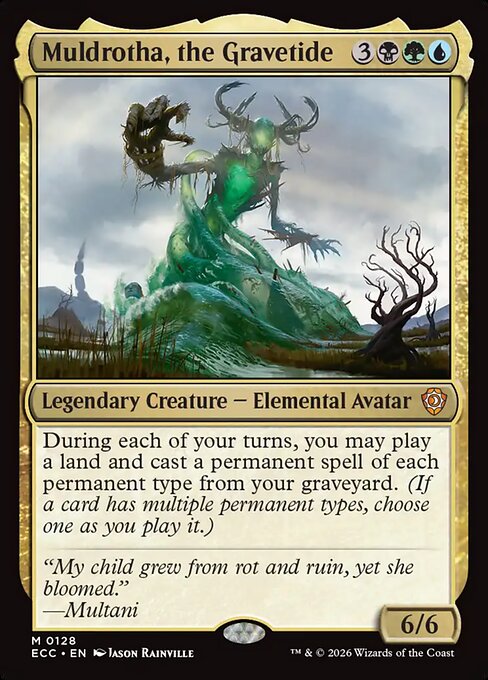
Muldrotha, the Gravetide
Commander and recursion engine
The example deck wants permanents that can be replayed from the graveyard, so search results are judged by how well they work before and after they die.

Sakura-Tribe Elder
Ramp and land fixing
A low mana creature that sacrifices itself for a basic land, then can be replayed later in a recursion deck.
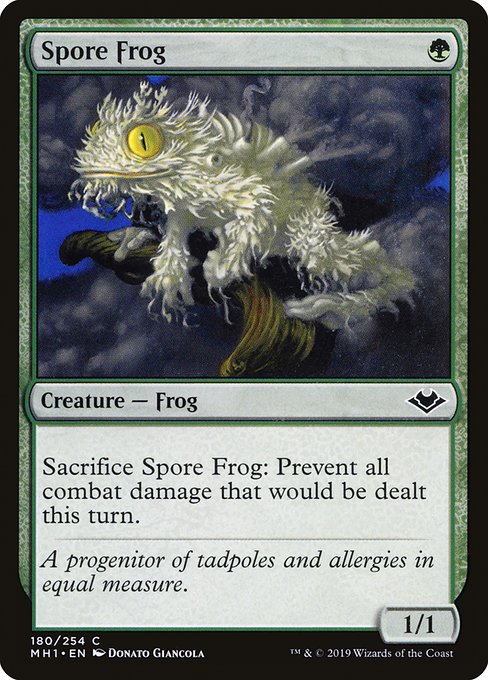
Spore Frog
Combat prevention
Sacrifice it to prevent all combat damage that turn. Muldrotha alone can recast it during your turn, not between every opponent's combat. One replay does not lock all three opponents out of combat.
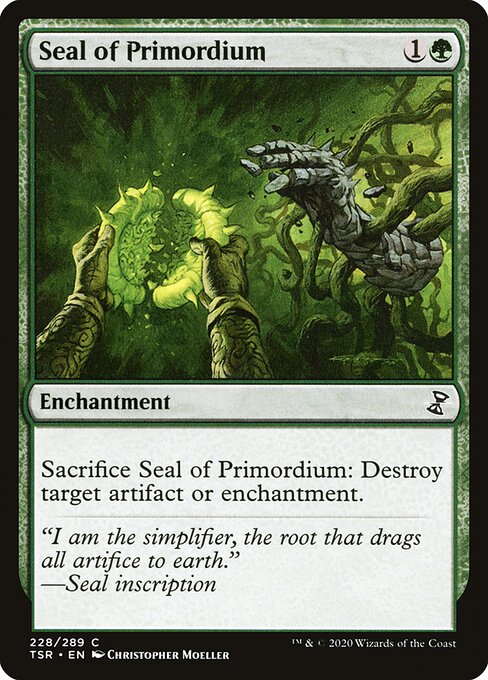
Seal of Primordium
Artifact and enchantment removal
A permanent based answer that sits on the battlefield, threatens a problem card, and works naturally with permanent recursion.
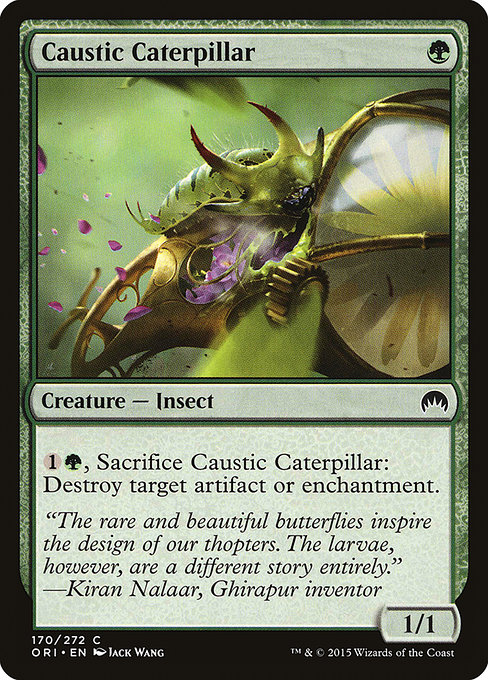
Caustic Caterpillar
Artifact and enchantment removal on a creature
A creature based answer that costs little upfront but asks for mana when it is time to sacrifice it.
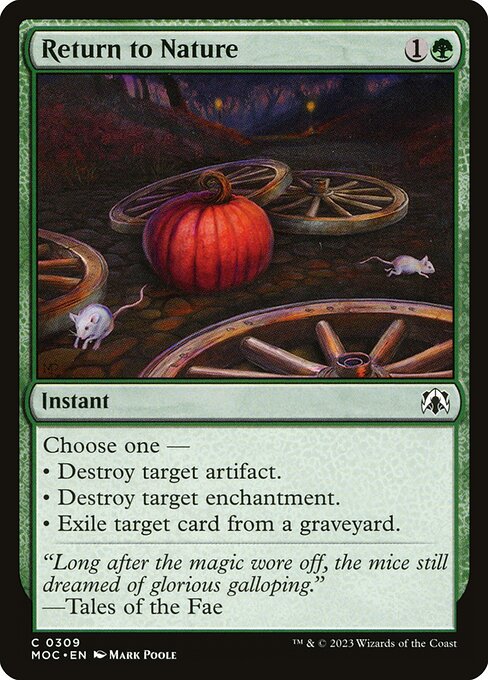
Return to Nature
Flexible instant to compare before the cut
Also exiles a card from a graveyard. A replacement that only destroys artifacts or enchantments gives up this mode.
The better search starts with a missing job
Commander players often open a card finder with a card name in mind. Better deck tuning starts one step earlier: what job is the deck failing to perform? If your graveyard deck dies to combat, search for prevention or cheap blockers. If it stalls on four mana, search for ramp below three mana. If your table has dangerous artifacts and enchantments, search for interaction your commander can reuse.
This walkthrough uses Muldrotha, the Gravetide because its incentives are easy to see. Muldrotha rewards permanents, sacrifice abilities, and cards that stay useful after they die. That changes how you evaluate Sakura-Tribe Elder, Spore Frog, Seal of Primordium, and Caustic Caterpillar.
The practical Deckcipher workflow is simple: search the commander, translate its text into roles, run a rules-text search with exact filters, sort the results, save realistic candidates to Deck Builder, make one named cut, then test the swap against a written success condition.
Step 1: Use name search to anchor the deck around the commander
Start in Deckcipher Card Search with the Name field set to Muldrotha, the Gravetide. Open the card, read the full text, and write three build rules before searching anything else: prefer permanents over instants and sorceries when the effect is close, value cards that sacrifice themselves, and protect the early curve because Muldrotha costs six mana.
Now search known examples by name to create comparison anchors. Sakura-Tribe Elder shows what a strong ramp hit looks like: mana value 2, creature, sacrifices itself, finds a basic land, and returns later as your creature replay for the turn. Spore Frog shows what a narrow metagame card looks like: weak against combo and drain, but excellent when repeated combat steps are how you lose.
Seal of Primordium and Caustic Caterpillar show two versions of the same job. Both answer artifacts or enchantments and both go to the graveyard naturally. The question is not which card is universally stronger. The question is which one fits the turn pattern of your current Muldrotha list.
What the first name searches tell you
| Search | Immediate lesson | Question to ask before adding it |
|---|---|---|
| Muldrotha, the Gravetide | The deck rewards permanents that can be replayed from the graveyard. | How many cards in this list are actually permanents the commander can reuse? |
| Sakura-Tribe Elder | Ramp that sacrifices itself supports the graveyard plan. | Does this ramp spell fix colors early and remain useful later? |
| Spore Frog | Some one mana cards become serious defensive tools with recursion. | Does my table pressure life totals through combat often enough to justify this slot? |
| Seal of Primordium | Removal on a permanent can be replayed and can deter opponents. | Do I want a visible answer that changes how opponents sequence threats? |
| Caustic Caterpillar | A creature answer may be easier to recur but can require extra mana. | Can my deck afford to hold up activation mana when I need the answer? |
Step 2: Run the ramp search with exact filters
Open the advanced filters in Card Search. Set Rules text to search your library for a basic land, Type line to creature, and Format legality to Commander. Under Commander identity choose At most selected identity and tick blue, black, and green. For Mana value choose less than or equal and enter 3. Choose Mana value under Sort order. This is an upper limit, not a separate minimum-and-maximum control. Leave Colors on Ignore colors: requiring an exactly blue-black-green card would hide mono-green cards that belong in the deck.
You can also enter a complete query in the main search box: id<=bug f:commander mv<=3 t:creature o:"search your library" o:"basic land". This finds a candidate pool, not a list of interchangeable ramp spells. Read each result to distinguish putting a land into your hand from putting one onto the battlefield. Sakura-Tribe Elder costs {1}{G} and sacrifices itself to put a basic land onto the battlefield tapped. It improves a later turn; it does not immediately refund two untapped mana when you cast it.
Add Sakura-Tribe Elder when the deck needs early land ramp that remains useful in the graveyard plan. Do not add it merely to reach a prescribed ramp count. If your list already develops mana reliably, put it in the maybeboard and test whether a different role needs the slot more. A card finder should help you choose between jobs, not turn every sensible search result into an automatic inclusion.
Step 3: Search removal by text, type, and timing
For the removal search, enter this complete query in the main search box: id<=bug f:commander mv<=3 is:permanent o:"destroy target artifact or enchantment". The permanent test is is:permanent. Typing permanent into Type line would search for that word as a card type instead. Keep artifact or enchantment as one phrase. Requiring both destroy target artifact and destroy target enchantment as separate exact phrases would miss cards whose text combines those targets with or.
That search includes Seal of Primordium and Caustic Caterpillar. Seal costs {1}{G} to cast and has no mana activation cost. Caterpillar costs {G} to cast, then {1}{G} and a sacrifice to activate. That is two mana at the answer window and three mana across deployment and activation. Creature typing can still justify it, but the cheaper casting cost does not make it the cheaper complete answer.
Compare the results against your deck rather than against a popularity score. An instant answer can act immediately when drawn, while a permanent answer can become a later Muldrotha replay. A permanent with a strong activated ability might need extra mana you cannot spare. Put only the candidates with a clear advantage for your current list into the maybeboard, and keep the original card while you work through that tradeoff.
Step 4: Apply Commander color identity and legality filters early
Commander identity is different from printed color. Colored mana symbols in a card's mana cost and relevant rules text, color indicators, and both faces of a double-faced card can matter. Reminder text is excluded. For this search, At most selected identity allows any subset of blue, black, and green, including no colors. Exactly selected identity would demand all three colors and exclude the mono-green examples in this walkthrough.
Muldrotha lets you play a land and cast a permanent spell of each permanent type from your graveyard during each of your turns. This permission does not give an extra land play or override normal timing rules. Seal of Primordium uses an enchantment casting permission; Caustic Caterpillar, Sakura-Tribe Elder, and Spore Frog compete for the creature permission. Casting all three creatures from the graveyard in one turn requires more than this commander alone.
That slot pressure is the real Seal versus Caterpillar decision. If your graveyard turns already use the creature replay on ramp, combat prevention, or value creatures, Seal may be better because the enchantment replay is open. If your enchantment slot is crowded and you have creature sacrifice synergies, Caterpillar may be the cleaner fit.
Filter choices for the Muldrotha example
| Deck need | Useful filters | Why it matters |
|---|---|---|
| Early ramp | Rules text “search your library for a basic land,” mana value at most 3, type Creature, Commander legal, Sultai color identity, price ceiling if needed | Finds ramp that is live before the commander and can matter after recursion begins. |
| Combat defense | Rules text “prevent all combat damage,” mana value at most 2, type Creature, Commander legal, Sultai color identity | Finds cheap defensive tools that can be replayed instead of one-shot protection. |
| Artifact and enchantment removal | Complete query with is:permanent, mv<=3, f:commander, id<=bug, and o:"destroy target artifact or enchantment" | Separates reusable permanent answers from one-time spells. |
| Budget sensitive upgrades | Role-specific text first, then a usd price query condition, Commander legal, Sultai color identity, mana value range | Keeps the candidate pool realistic without letting price override curve or synergy. |
| Set restricted build | Set filter, Commander legal, Sultai color identity, type and text filters, maybe-board role label | Useful for collection based building, theme constraints, or checking whether a recent release added a new option. |
Step 5: Demonstrate price and set filters after the role is clear
Set and price filters are practical, not strategic. They help you find cards you own, cards from a release, or cards that fit a budget. Start with the role first, then apply budget or set constraints.
For a price ceiling, add usd<=3 to the complete removal query in the main search box. This condition concerns the dollar pricing data used by the search service, which can differ from the currency selected for displayed estimates. Cards with no qualifying price may disappear. Clear that condition when you want a complete functional comparison, then inspect available printings and shopping links. A price filter does not promise a particular purchase price after condition, shipping, or availability is considered.
The advanced filters also have a Set code field. To inspect Modern Horizons 3, for example, enter mh3 there and combine it with your role, mana value, and Commander identity filters. This is a set-specific discovery exercise, not a claim that it contains every card already discussed. Switch Unique results from Cards to Prints when the printing matters. A set-restricted pool answers a different question from finding the most suitable effect across all releases.
Build your deck and save the search results
Open Deckcipher Deck Builder, add your commander, move search candidates into the main deck or maybe-board by role, and save the evolving list so each search becomes a trackable decision.
Step 6: Compare the four focus cards by role and replay pattern
At this point, the card finder has done its job: it created a short, legal, role-specific candidate pool. The final comparison happens in deck context. Ask what turn the card improves, what permanent type it consumes under Muldrotha, and what board state makes it good.
Muldrotha candidate comparison
| Card | Role | First-cast cost | Activation cost | Muldrotha replay type | Best board state | Weakness | When to include |
|---|---|---|---|---|---|---|---|
| Sakura-Tribe Elder | Ramp and fixing | 2 mana | Sacrifice, no mana | Creature | Early hand needs lands or colors; late game has Muldrotha and wants land drops | Uses the creature replay slot later | Include when the deck needs more two-mana ramp or consistent commander timing |
| Spore Frog | Combat prevention | 1 mana | Sacrifice, no mana | Creature | Opponents attack for lethal or wide combat damage | Does little against combo, drain, exile, or noncombat wins | Include when combat damage is a repeated loss pattern in your pod |
| Seal of Primordium | Artifact and enchantment removal | 2 mana | Sacrifice, no mana | Enchantment | You can deploy an answer before the threat or hold a visible deterrent | Telegraphs the answer and uses the enchantment replay slot | Include when upfront payment, deterrence, or an open enchantment slot matters |
| Caustic Caterpillar | Artifact and enchantment removal | 1 mana | {1}{G} and sacrifice | Creature | You need cheap setup, creature synergies, or a tutorable body | Needs two mana to activate and competes for creature replay | Include when creature typing matters more than zero-mana activation |
In the example list, the enchantment replay slot is less crowded than the creature replay slot. That points toward Seal of Primordium for the main deck. Caustic Caterpillar stays in the maybe-board with the note “swap in if creature synergies increase or enchantment slot gets crowded.”
Step 7: Make the cut with a written reason
For a concrete sample swap, replace Return to Nature with Seal of Primordium only when the deck can afford the lost flexibility. Both can answer an artifact or enchantment. Return to Nature can also exile a card from a graveyard, and Seal cannot. The reason for this example is: the list already has other graveyard interaction, but needs a reusable artifact or enchantment answer. That makes a permanent-based answer worth testing in this particular slot.
If Return to Nature is your only timely answer to a graveyard combo, keep it until you add another suitable graveyard answer. Likewise, do not cut an answer to any permanent for an artifact-and-enchantment-only answer without checking the threats you lose coverage against. Count functions after a swap, not just cards in the removal category. A more synergistic card can still leave the deck worse equipped for its actual opponents.
For ramp, the named cut should also protect structure. If the deck runs an overcosted value card that does not affect the board before turn five, that is a better cut for Sakura-Tribe Elder than cutting a land.
- Write the problem: the list needs artifact and enchantment removal it can reuse.
- Run the complete query id<=bug f:commander mv<=3 is:permanent o:"destroy target artifact or enchantment".
- Compare casting cost, activation cost, and the permanent type used for graveyard casting.
- Put Seal of Primordium in the main list for the test and keep Caustic Caterpillar in the maybeboard.
- Consider cutting Return to Nature only after confirming another card covers graveyard interaction.
- Write down the expected benefit and the coverage or timing you lose.
- Use the deck audit to check the full list and test the change against real opponents.
Step 8: Use Deck Builder to save roles, not just cards
After narrowing the results, open Deck Builder and add the selected card by name. Put close alternatives in the maybeboard so they do not inflate the main deck. Record a short note with the list or primer: which job the card fills, what came out, and what result would justify keeping the change. Create a free account to save the list and return to those decisions later.
For this example, the change is Return to Nature out and Seal of Primordium in, on the condition that graveyard interaction remains covered elsewhere. Caustic Caterpillar stays under consideration if creature typing becomes more valuable than the extra activation mana. Spore Frog is a separate candidate for a combat-heavy group. It is not a replacement for artifact removal and does not prevent noncombat damage or life loss.
Then run the Commander Deck Audit or Commander Deck Building Checklist. After the Seal swap, check whether your interaction count stayed stable, whether your permanent count increased, and whether the deck still has enough early ramp.
Check the deck after the swap
After you add Seal of Primordium or any other candidate, use the Commander Deck Audit to check whether the list still has enough mana, interaction, card advantage, and role balance.
Step 9: Test the change with a repeatable protocol
Do not make five swaps from one search session and then guess what improved. For the ramp package, goldfish ten opening hands. Record whether you have green mana by turn two, whether Sakura-Tribe Elder or another two mana ramp piece appears, and whether Muldrotha can realistically be cast by turn five or six.
For the Seal of Primordium swap, play three real games before declaring victory. Track four events: was Seal drawn or milled, was it cast before a target appeared, was it replayed with Muldrotha, and was it stranded because the enchantment slot or mana timing did not work?
Three games are an initial observation window, not a reliable statistical verdict. If you never draw or mill Seal, those games tell you little about the swap. Keep testing and record specific decision windows: could the old card have answered something Seal could not, did you have time to cast the enchantment, and did a later Muldrotha replay matter? Prefer evidence about the original problem over a rule such as keeping a card whenever it was useful once.
Common mistakes when using a Commander card finder
The first mistake is searching too broadly. If you search only for “draw a card” or “destroy target” without color identity, legality, mana value, or type, you will spend more time browsing than deciding.
The second mistake is comparing cards outside deck context. Caustic Caterpillar is not always better or worse than Seal of Primordium. The answer depends on recursion lanes, mana timing, and your current list.
The third mistake is adding synergy without cutting redundancy. Muldrotha makes many permanents look appealing, but every added card must push out something and improve a needed role.
The fourth mistake is letting price define quality. Budget matters, but the search still starts with the job. Find early ramp, removal, or draw first; then narrow to the cards you can afford.
Concrete next steps
Move the best candidates into Deck Builder, label maybe-board cards by role, make one named cut, and save the list so the change is trackable. If you are unsure which category is weak, use the Commander Deck Building Checklist or Commander Deck Audit.
FAQ
How do card finders assist in Commander deck building?
A card finder turns a deck problem into a focused candidate list. Search by rules text, type, mana value, color identity, legality, set, and price, then compare the results against your commander plan and current deck structure.
How can Deckcipher card search and deckbuilding tools improve Commander construction?
Use Deckcipher Card Search to find candidates, Deck Builder to place them in an actual list or maybe-board, and the Commander Deck Building Checklist or Commander Deck Audit to see whether the swap improved the deck’s structure.
How do I perform a useful name search?
Start by searching the commander by exact name, such as Muldrotha, the Gravetide. Then search role examples like Sakura-Tribe Elder, Spore Frog, Seal of Primordium, or Caustic Caterpillar to shape broader searches.
What advanced filters matter most for Commander?
Commander color identity and legality usually come first. After that, use rules text, mana value, type, set, and price depending on the problem. For Muldrotha, permanent type is especially important because the commander replays permanents from the graveyard.
What exact Deckcipher search should I use for Muldrotha ramp?
Use Rules text search your library for a basic land, Type line creature, Format legality Commander, and a Mana value limit of less than or equal to 3. Under Commander identity choose At most selected identity and tick blue, black, and green. Then read whether each result puts a land into hand or onto the battlefield.
What exact Deckcipher search should I use for Muldrotha artifact and enchantment removal?
Enter id<=bug f:commander mv<=3 is:permanent o:"destroy target artifact or enchantment" in the main Card Search box. The combined phrase matches the actual wording on Seal of Primordium and Caustic Caterpillar. Compare the results by casting cost, activation cost, and which permanent type the commander would replay.
What are the roles of Sakura-Tribe Elder, Spore Frog, Seal of Primordium, and Caustic Caterpillar in a Muldrotha deck?
Sakura-Tribe Elder is early ramp and fixing. Spore Frog is combat prevention. Seal of Primordium is an enchantment-based answer. Caustic Caterpillar is a creature-based answer with an activation cost.
Should I choose Seal of Primordium or Caustic Caterpillar?
Choose Seal of Primordium when the enchantment slot, visible deterrence, or upfront payment matters. Choose Caustic Caterpillar when creature typing, one mana setup, creature tutors, or sacrifice synergies matter more.
What should I cut for Seal of Primordium in Muldrotha?
Return to Nature is a possible cut only if the deck still has adequate graveyard interaction elsewhere. Seal of Primordium can answer artifacts and enchantments and can be replayed with Muldrotha, but cannot replace the instant's graveyard-exile mode.
Can a card finder optimize my deck automatically?
No. A card finder produces better candidates faster, but optimization still requires deck context and testing. You need to know the problem, the cut, and whether the change performs better in games.
What is the best next step after finding a promising card?
Add it to your deck list or maybe-board, make one named cut, and write a short reason for the swap. Then test for the original problem: ramp timing, removal coverage, combat survival, or whichever role started the search.